
Play Google Solitaire free in your browser. Pick Easy mode for draw-one or Hard mode for draw-three, deal, and start. No download, no account, no waiting — it runs on desktop, tablet and phone.
This is Klondike, the same card game built into Google Search. The difference is you get the full board instead of a small box wedged between search results, and you don’t have to run a search to reach it. The game above is live right now.
Play Google Solitaire full screen
No account. No download needed.
Note: This website is an independent project created by card game fans. We are not affiliated with, endorsed by, or connected to Google LLC in any way.
How to Play Google Solitaire
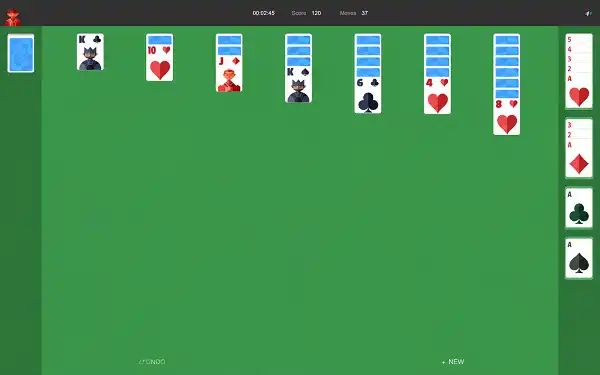
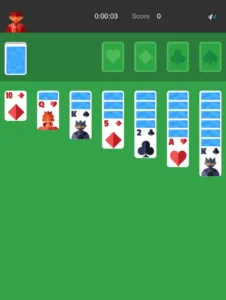
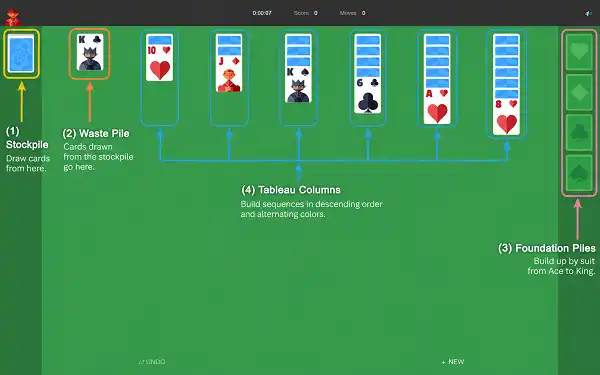
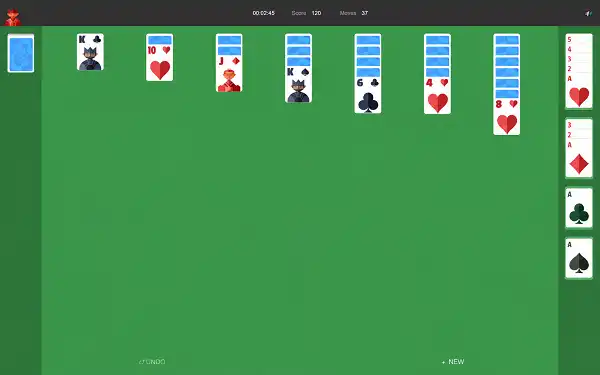
Fifty-two cards deal into seven columns called the tableau. The first column gets one card, the second gets two, and so on to seven in the last — but only the top card of each column starts face up. The remaining 24 cards sit in the stockpile in the top-left corner. The four empty spaces above the tableau are your foundations, one per suit.
Your goal is to move all 52 cards into those foundations, each built from Ace up to King in a single suit. To get there, you build downward in the tableau in alternating colours: a red seven onto a black eight, a black jack onto a red queen. Aces go straight to the foundation the moment they appear. When you run out of moves, click the stockpile to draw. Clear a column completely and only a King can fill the gap.
The undo button has no penalty and no limit. Use it freely while you’re learning — reversing a move you regret is how you build the instinct to avoid it next time.
→ The full step-by-step guide, including the moves most beginners miss
Google Solitaire Rules
Klondike’s rules haven’t changed in decades, and this version follows them exactly. Six rules cover the entire game:
| Rule | How it works |
|---|---|
| Tableau stacking | Descending order, alternating colours. Red on black, black on red. |
| Foundations | Built by suit, ascending. Only an Ace can start one. All four must be completed to win. |
| Empty columns | Only a King, or a sequence beginning with a King, can move into an empty column. |
| Group moves | A correctly ordered run of face-up cards moves as a single unit. |
| Stockpile | Cycle as many times as you like in either mode. Hard mode draws three at a time, which buries cards you need. |
| Winning | All 52 cards in the foundations. The game animates the win automatically. |
→ Every rule in full, including the edge cases that decide close games
Easy Mode or Hard Mode — Which Should You Pick?
| Easy (Draw 1) | Hard (Draw 3) | |
|---|---|---|
| Cards flipped per click | 1 | 3 — only the top card is playable |
| Stockpile cycling | Unlimited | Unlimited |
| Typical win rate | ~33% casual · ~80%+ with strategy | ~11% |
| Best for | New players, relaxed sessions | Players who want a real challenge |
Start on Easy. Hard Mode before you’ve mastered the basics isn’t more fun — it’s just harder to finish. Switch once you’re winning Easy games consistently.
→ How Hard Mode changes your strategy from the very first move
Five Tips That Change Your Win Rate
Most people play on instinct, moving whatever card is available without thinking two moves ahead. That’s fine for a casual game. If you want to win more often, these five habits do most of the work:
- Uncover before you build. Every face-down card you reveal adds options. Early on, the move that flips a hidden card beats the move that looks tidier.
- Don’t empty a column without a King ready. An empty column is the most valuable thing on the board, and it’s wasted if you have nothing to put in it.
- Aces up immediately, low cards with caution. Aces are useless in the tableau. But a 2 or 3 left in play can keep a column moving when the foundation can’t help you yet.
- Check the waste pile every draw. Its top card is always playable and it’s the easiest thing on the board to forget.
- Draw from the stockpile first. Turning that first card before you touch anything else costs nothing and gives you one more option to work with.
→ All 10 tips, with the reasoning behind each one
Where Solitaire Came From
Solitaire has no single inventor. The first written record of a one-player patience game appears in a German book from 1783, though people were almost certainly playing it long before anyone wrote it down. In Scandinavia it was called kabale — “secret knowledge” — because it started out tied to fortune-telling with cards rather than to leisure.
The modern story begins on 22 May 1990, when Microsoft shipped Windows 3.0 with a card game bundled inside. Microsoft Solitaire was written by a 25-year-old intern named Wes Cherry in his spare time, and it went on to become one of the most-played pieces of software ever made. Google added its own playable Klondike game directly to search results in August 2016, built on the same rules Microsoft standardised.
→ The full 250-year history, and how a fortune-telling ritual became the world’s most-played card game
Is Solitaire Actually Good for You?
Most ways of relaxing are passive — television, scrolling, music in the background. Solitaire isn’t. It looks like a way to kill time, and it is, but your brain works the whole way through: holding card positions, tracking what’s face-down, testing a plan and revising it when it fails.
That’s working memory under load, and research on card games consistently links regular play to maintaining it, particularly with age. Brain imaging has shown reduced amygdala activity during strategy card games, which is part of why solitaire feels calming rather than taxing. A 2003 New England Journal of Medicine study found regular card play associated with reduced dementia risk.
→ The actual research, and what it does and doesn’t prove
More Solitaire Games
Klondike is where nearly everyone starts, but it’s one variant out of dozens. Each of these plays completely differently:
- Spider Solitaire — two decks, ten columns, same-suit sequences. A real step up.
- FreeCell Solitaire — every card visible from the deal. Almost every game is winnable.
- Pyramid Solitaire — pair cards to thirteen and clear the pyramid. Short, sharp rounds.
- TriPeaks Solitaire — combo scoring and fast rounds, the quickest game here.
- Golf Solitaire — clear the tableau in as few strokes as you can.
- Hearts — trick-taking against three AI opponents. Avoid the Queen of Spades.
- Four Colors — UNO-style card game, fast and competitive.
Other Google Doodle Games
- Google Pac-Man Doodle
- Google Snake Doodle
- Doodle Cricket
- Doodle Baseball
- Google Minesweeper
- Google Block Breaker
Frequently Asked Questions
Is Google Solitaire free to play?
Yes, completely. No account, no download, no subscription. Click the game above, choose a difficulty, and play.
Does the game work on mobile?
Yes, on iPhone and Android. Tap a card to select it and tap again to move it, or drag. The board resizes automatically to your screen.
Can every game of Google Solitaire be won?
No. Roughly 18–21% of Klondike deals have no winning sequence at all, regardless of how well you play. If you’ve cycled the entire stockpile several times with no legal moves left, the deal is almost certainly unwinnable. Start a new one.
Is this the same game that appears in Google Search?
It follows the same Klondike rules, the same card mechanics and the same win conditions, with the same Easy and Hard options. We are not affiliated with Google LLC — this is an independent version you can open directly, without searching first.
How long does a game take?
Between 5 and 20 minutes, depending on difficulty and how the cards fall. Most casual players average 8–10 minutes in Easy Mode.
Can I undo moves?
Yes, at any point, with no penalty and no limit. Use it freely while you’re learning.
How do I play Google Solitaire in full screen?
Use the full screen button above, or press F11 on Windows and Ctrl + ⌘ + F on Mac to hide your browser bars as well. Our full screen Google Solitaire page has the shortcut for every device.