

Play Google Tic-Tac-Toe free. Race the clock across 4 AI difficulties, including an Elite mode that starts with random cells pre-filled. Google Tic-Tac-Toe looks like the simplest game ever made – a 3×3 grid, two symbols, three in a row wins. This version adds a real twist most versions don’t bother with: a ticking clock on every move, an AI that gets genuinely unbeatable at the top setting, and a special Elite mode that throws two random symbols onto the board before you’ve even made your first move. No downloads, no account required to start. Works in Chrome, Firefox, Edge, and on mobile.
What Is Google Tic-Tac-Toe?
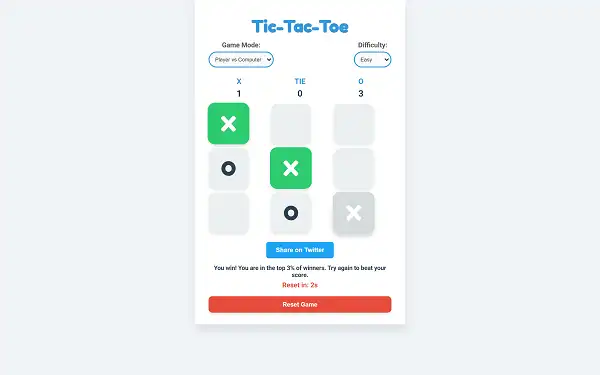
Google Tic-Tac-Toe is a free, browser-based version of the classic two-player strategy game, played on a 3×3 grid where players take turns placing their symbol – X or O – trying to be the first to line up three in a row horizontally, vertically, or diagonally. This version goes further than a basic port: every move is timed, there are four distinct AI difficulty levels rather than the usual two or three, a persistent scoreboard tracks your results across an entire session, and winning quickly enough even earns you a speed ranking you can share.
What keeps a game this simple genuinely interesting is that it’s a “solved” game – with perfect play from both sides, every match ends in a draw. That fact is exactly what makes the top difficulty setting meaningful: it plays mathematically perfect Tic-Tac-Toe, meaning your absolute best possible outcome against it is a tie, not a win.
The Surprisingly Deep History of a Simple Game
Tic-Tac-Toe’s roots go back much further than most people realize. Archaeologists have found game boards resembling a 3×3 grid etched into roof tiles at the Temple of Kurna in ancient Egypt, dating back to around 1300-1400 BCE – making some version of this grid-and-symbols concept well over 3,000 years old. The ancient Romans played a close relative called “Terni Lapilli,” with one key difference from the modern game: each player only had three pieces total and had to move them around the board after placing them, rather than filling the grid permanently.
The name and rules we know today solidified much later, in 19th-century Britain, where the game was known as “Noughts and Crosses” – the earliest known print reference comes from Anthony Trollope’s 1864 novel “Can You Forgive Her,” which mentions a clerk playing “tit-tat-toe.” The specific term “tick-tack-toe” itself first appeared in print in 1884, originally describing a different pencil-and-slate game entirely, with the name possibly borrowed from “tick-tack,” a term for an old variant of backgammon dating back to 1558. Regional variations exist worldwide too – the game is known as “Luk Tsut K’i” in China and “Achi” in parts of Africa, each with slightly different traditional rules.
Tic-Tac-Toe’s biggest claim to fame in computing history came in 1952, when a program called OXO – built by Alexander S. Douglas at the University of Cambridge – let a human play Tic-Tac-Toe against a computer on the EDSAC machine. It’s widely considered one of the very first video games ever created, and its computer opponent is one of the earliest examples of video game AI in existence. That legacy is exactly why Tic-Tac-Toe still gets used to teach the minimax algorithm today – the same core logical approach powering the unbeatable AI in this version, decades later.
How to Play Google Tic-Tac-Toe
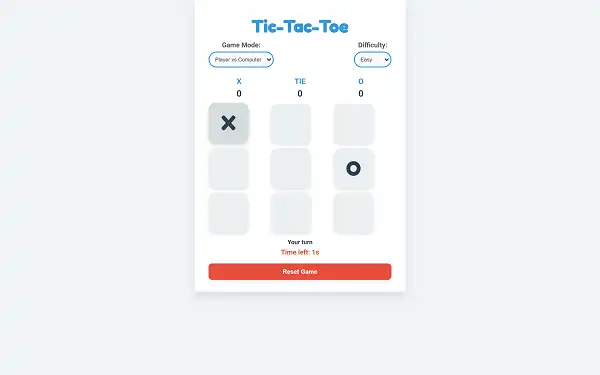
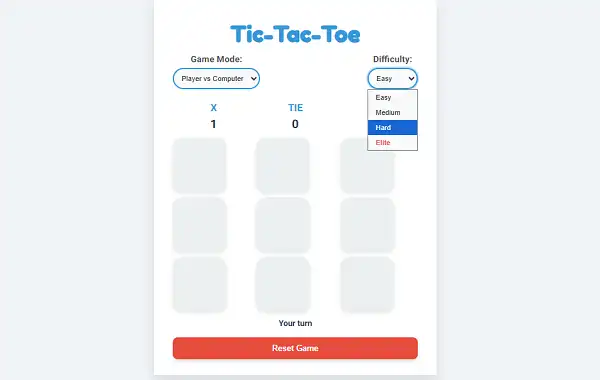
- Choose your Game Mode. Player vs Player for a local match against a friend, or Player vs Computer to face the AI.
- Select a Difficulty if playing the Computer. Easy, Medium, Hard, or Elite – each plays meaningfully differently.
- Take your turn before the clock runs out. You have a limited window to place your symbol – let it expire, and you automatically lose the round.
- Aim for three in a row. Horizontal, vertical, or diagonal lines all count as a win.
- Block your opponent’s threats. Watch for any line where your opponent has two symbols already placed with the third space open, and take that space before they can.
- Watch your score tally build. X wins, O wins, and ties are all tracked separately across as many rounds as you keep playing.
- Let the round auto-reset. After a win, loss, or draw, a short countdown automatically starts the next round – no need to manually click anything to keep playing.
Controls
| Action | Input |
|---|---|
| Place your symbol | Click or Tap an empty grid square |
Clicking or tapping an open square is the entire control scheme – all of the actual challenge lives in the strategy and the ticking clock, not the interface itself. Keyboard users can also tab between cells and press Enter or Spacebar to select one.
The Move Timer
Every single turn is timed, which is what genuinely sets this version apart from a standard, untimed Tic-Tac-Toe implementation. On Easy, Medium, and Hard difficulty, you have 3 seconds to place your symbol once it’s your turn. On Elite difficulty, that window extends slightly to 5 seconds – a small mercy, given how much tougher the rest of Elite mode is. Let the countdown reach zero without making a move, and you automatically forfeit the round to the computer. This timer applies whether you’re playing against the AI or against a friend locally, so hesitating too long is a real, immediate cost in every single match.
Difficulty Levels
- Easy – The computer picks a completely random open square every turn, with no strategy at all. A genuinely easy win for anyone who understands basic Tic-Tac-Toe.
- Medium – The computer specifically checks whether you’re one move away from winning and blocks that line if it can. Outside of that single defensive check, it otherwise moves randomly – meaning it won’t set up its own winning threats, but it will stop yours.
- Hard – The computer plays a fully optimal game using the minimax algorithm, calculating every possible outcome from the current board state to always choose the objectively best move. This setting cannot be beaten through normal play – the best possible result is a draw.
- Elite – Uses the same unbeatable minimax logic as Hard, but with a major twist: the board doesn’t start empty. Two random squares are already filled with a random mix of X’s and O’s the instant the round begins, before either player has made a real choice. This means you’re improvising a game plan around a partially-set board from move one, on top of facing an AI that never makes a mistake, and with a slightly longer 5-second timer to compensate for the added complexity.
Game Modes
- Player vs Player – Share a device with a friend and take turns placing X’s and O’s directly against each other, with the same move timer applying to both of you.
- Player vs Computer – Face off against the AI at your chosen difficulty. Who goes first alternates each round – if the computer opened one round, you’ll open the next, and vice versa.
Scoreboard and Round Flow
A persistent scoreboard tracks three separate tallies throughout your session: total X wins, total O wins, and total ties. These numbers keep accumulating across as many rounds as you play in a row, rather than resetting after every match, giving you a running record of the session rather than just a single game’s outcome. The currently active player’s side of the scoreboard is also visually highlighted, making it easy to tell at a glance whose turn it is without needing to read the status text.
Once a round ends – whether by a win, a draw, or someone running out of time – a short 3-second countdown automatically begins, after which the board resets and the next round starts on its own. There’s no need to manually click a “play again” button between rounds, which keeps repeated matches moving quickly.
Win Speed Ranking
Win a round, and the game calculates exactly how many seconds it took you from your very first move to victory, then ranks that speed against rough percentile bands:
| Time to Win | Percentile |
|---|---|
| 1 second or less | Top 0.5% of winners |
| Up to 3 seconds | Top 1% of winners |
| Up to 5 seconds | Top 3% of winners |
| Up to 10 seconds | Top 5% of winners |
| Longer than 10 seconds | Top 30% of winners |
A fast win unlocks a share button, letting you post your exact win time and percentile ranking directly to challenge others to beat it – turning even a single quick match into a small bragging-rights moment.
Tips and Tricks
- Don’t overthink easy decisions under the timer. With only 3 seconds on most difficulties, spending too long deliberating an obvious block or an obvious winning move is how you accidentally forfeit a round you were actually winning.
- Take the center square when you can. It’s part of more potential winning lines than any other square, making it generally the strongest opening move available – and grabbing it quickly matters more here than in an untimed game.
- On Elite, assess the pre-filled cells immediately. Since two squares are already occupied randomly before you act, your very first move needs to account for whatever threats or opportunities those starting symbols already create – don’t play your opening move like the board is empty.
- Always check for your opponent’s immediate win before making your own move. This matters even more under a timer, since a rushed offensive move that ignores an open three-in-a-row for your opponent costs you the round immediately.
- Practice on Medium before jumping to Hard or Elite. Since Medium only blocks your wins without setting up its own threats, it’s a genuinely useful stepping stone for building faster decision-making before facing an opponent that never makes a mistake.
- Remember that a draw against Hard or Elite is a genuine success. Since perfect play from both sides always ends in a tie, consistently drawing against the unbeatable AI – especially with a partially-filled Elite board and a shorter margin for error – means you’re already playing about as well as anyone can.
- Chase a fast win specifically if you want the top percentile. Since the speed ranking is based purely on total time from your first move to victory, a deliberately aggressive, efficient line of play – rather than a cautious one – is what actually earns bragging rights.
Other Doodle Games
- Google Pac-Man Doodle
- Google Snake Doodle
- Doodle Cricket
- Doodle Baseball
- Google Solitaire
- Google Block Breaker
- Google Minesweeper
Frequently Asked Questions
What is Google Tic-Tac-Toe?
Tic-Tac-Toe is a free, browser-based version of the classic two-player strategy game, played on a timed 3×3 grid where the goal is to be the first to place three of your symbols in a row, against either an AI opponent or a friend.
How much time do I have to make a move?
3 seconds per move on Easy, Medium, and Hard difficulty, and 5 seconds per move on Elite difficulty. Running out of time forfeits the round automatically.
What’s different about Elite difficulty?
Elite uses the same unbeatable AI logic as Hard, but the board isn’t empty when the round starts – two random squares are pre-filled with a mix of X’s and O’s before either player makes a real move, forcing you to plan around an already-altered board from the start.
Can the AI be beaten on every difficulty?
Easy and Medium can be beaten, since the AI either moves randomly or only defends without attacking. Hard and Elite both play a mathematically perfect game using the minimax algorithm and cannot be beaten through normal play – the best possible outcome against either is a draw.
Why does Tic-Tac-Toe always end in a draw between good players?
Tic-Tac-Toe is a “solved” game – with perfect play from both sides, neither player can force a win, meaning the mathematically correct outcome of a flawless match is always a tie.
How does the win speed ranking work?
When you win a round, the game measures how many seconds it took from your first move and compares it against percentile bands – winning in under a second, for example, places you in roughly the top 0.5% of winners.
Does the scoreboard reset every round?
No. X wins, O wins, and ties are all tracked cumulatively across your entire session, only resetting if you refresh or leave the page.
Who goes first each round against the computer?
It alternates. If the computer went first in one round, you’ll go first in the next, and so on.
Was Tic-Tac-Toe really one of the first video games?
A digital version called OXO, built in 1952 at the University of Cambridge, let a human play against a computer and is widely considered one of the earliest video games ever created, along with one of the first examples of video game AI.
Can I play against a friend instead of the AI?
Yes. Player vs Player mode lets two people share the same device and play directly against each other, with the same move timer applying to both.
Which browser works best for Tic-Tac-Toe?
Tic-Tac-Toe runs well on any modern browser, including Chrome, Firefox, and Edge.
Why isn’t Tic-Tac-Toe loading?
Check your internet connection, make sure this site isn’t blocked on your network, and try disabling any ad blockers – these are the most common causes of loading issues.
Doodle Games