


Play Google Minesweeper free. Uncover safe tiles, flag mines, and beat your best time with a no-guessing board design. Google Minesweeper takes a puzzle that’s been quietly eating office hours since 1990 and gives it a clean, garden-green makeover with one genuinely clever twist: boards built to be solvable by pure logic, not luck. Uncover every safe tile, flag every mine, and try not to click the wrong square. No downloads, no account required to start. Works in Chrome, Firefox, Edge, and on mobile.
What Is Google Minesweeper?
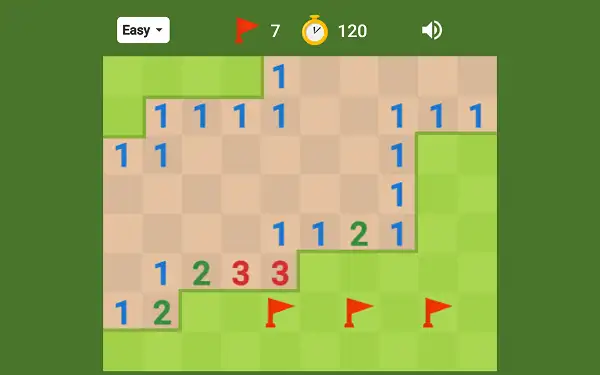
Google Minesweeper is Google’s own browser-based take on the classic logic puzzle, playable directly as an interactive game card in Google Search or through standalone browser versions like this one. You’re shown a grid of covered tiles, some of which hide mines. Your job is to uncover every tile that isn’t a mine, using number clues to work out where the mines must be – click a mine, and it’s game over. Google gave the classic grey Windows aesthetic a friendly green, garden-themed redesign, but the underlying logic is exactly the puzzle generations of office workers have been quietly obsessing over since the early 1990s.
What makes Google’s specific version stand out from a plain classic port is a “no-guessing” board generator, built to produce puzzles that are solvable through deduction alone rather than forcing you into a coin-flip guess partway through – a genuinely meaningful upgrade over the classic random-generation Minesweeper most people grew up with.
The Real History of Minesweeper
Minesweeper’s story starts a couple of years before most people ever saw it. In 1989, Microsoft employee Curt Johnson – hired to maintain a debugger for IBM’s OS/2 – wrote a small game for himself called “PM Mine,” named after his favorite Macintosh game (“Mine”) and OS/2’s windowing system (“Presentation Manager”). The goal was to cross a minefield using number clues alone. Fellow Microsoft employee Robert Donner, who joined around the same time, took Johnson’s shared source code and rewrote it for the newly released Windows 3.0 as “Win Mine.”
The game became so addictive internally at Microsoft that Bill Gates himself reportedly got hooked on it. It first shipped publicly as part of the Windows Entertainment Pack in October 1990, but its real explosion in popularity came in 1992, when it was bundled directly into Windows 3.1 – and from there, into essentially every version of Windows for the next two decades.
Estimates suggest Minesweeper was installed on over a billion computers between 1992 and 2012, making it one of the most widely distributed pieces of software in history, all without a single advertisement. Part of its inclusion was genuinely practical too: Microsoft wanted an easy, fun way to teach a whole generation of new PC users the then-unfamiliar skill of right-clicking.
Minesweeper’s fame didn’t come without a strange footnote: in 2001, an activist group calling itself the “International Campaign to Ban Winmine” publicly objected to a mine-clearing game using the imagery of real landmines, arguing it trivialized their impact – a genuinely real, if largely symbolic, piece of the game’s cultural history. Sadly, original co-creator Curt Johnson passed away in 2014, but the game he built for fun on an OS/2 debugger machine remains one of the most-played pieces of software ever written.
How to Play Google Minesweeper
- Choose a difficulty. Easy, Medium, or Hard – each increases both the board size and how densely packed the mines are.
- Click any tile to begin. Your very first click is always guaranteed safe and typically opens up a decent chunk of the board.
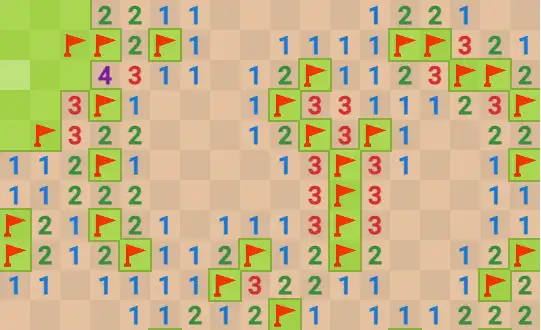
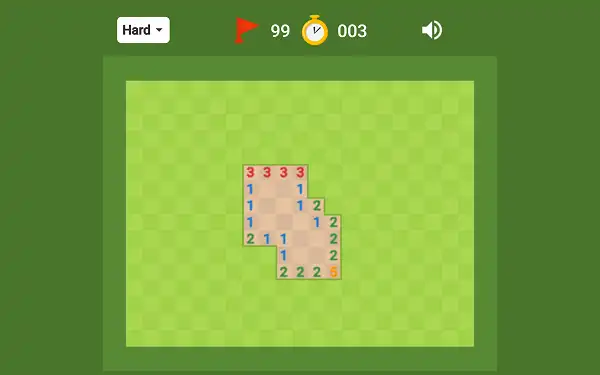
- Read the numbers. Every revealed number tells you exactly how many mines are hiding in the eight tiles surrounding it – directly adjacent and diagonal.
- Deduce and flag suspected mines. Right-click a tile you’re confident hides a mine to flag it, helping you track your reasoning and avoid clicking it by accident.
- Uncover tiles you’ve proven are safe. Use the numbers around flagged mines to work out which remaining covered tiles must be safe.
- Use chording to speed things up. Once a number’s mine count is fully satisfied by your flags, clicking it again with both mouse buttons (or middle-click) instantly reveals all of its remaining unflagged neighbors at once.
- Clear every non-mine tile to win. You don’t need to flag every mine – just uncover all the tiles that aren’t one.
Controls
| Action | Desktop | Mobile |
|---|---|---|
| Uncover a tile | Left Click | Tap |
| Flag a tile | Right Click | Long-press |
| Chord (reveal satisfied neighbors) | Left + Right Click together, or Middle Click | Varies by device |
Reading the Numbers
Every revealed number represents exactly how many of its eight surrounding tiles – up, down, left, right, and the four diagonals – contain a mine. A blank tile with no number means none of its neighbors are mines, which is why uncovering a blank triggers a cascade: the game automatically reveals every connected blank tile and the numbered tiles bordering that empty region, often opening a large portion of the board in a single click.
Google colors each number to help you scan the board faster at a glance: 1 is blue, 2 is green, 3 is red, 4 is dark blue or purple, 5 is maroon, 6 is teal, 7 is black, and 8 is grey. Experienced players lean on this color-coding heavily rather than reading each digit individually, since it’s genuinely faster to process color first.
Difficulty Levels and Board Sizes
Google Minesweeper offers three difficulties on the web version, each enlarging the board and increasing mine density:
| Difficulty | Board Size (Width × Height) | Mines | Mine Density |
|---|---|---|---|
| Easy | 10 × 8 | 10 | ~12.5% |
| Medium | 18 × 14 | 40 | ~15.8% |
| Hard | 24 × 20 | 99 | ~20.6% |
On mobile, Google adjusts the board to a taller, narrower shape suited to phone screens – roughly 6×12 with 10 mines on Easy, 10×21 with 35 mines on Medium, and 13×28 with 75 mines on Hard, though exact dimensions can vary slightly by device.
Interestingly, Google’s board sizes aren’t the same as the classic Microsoft dimensions most longtime players grew up with. The original Windows Minesweeper used Beginner (8×8, 10 mines), Intermediate (16×16, 40 mines), and Expert (30×16, 99 mines) – Google keeps the same mine counts for each equivalent tier, but reshapes the boards into different width-to-height ratios entirely.
The No-Guessing Algorithm
One of the most meaningful differences between Google’s version and classic random-generation Minesweeper is board fairness. Traditional Minesweeper can occasionally box you into a genuine 50/50 guess – two remaining tiles where the numbers give you no way to logically determine which one hides the mine, meaning a perfectly-played game can still be lost to pure chance. Google’s generator specifically tries to avoid this, building boards that are solvable through deduction alone. It isn’t a perfect guarantee – a small fraction of boards can still contain an unavoidable guess – but the significant majority of games, especially on Easy and Medium, can be fully solved through logic without ever needing to gamble.
Timer and Best Times
Minesweeper isn’t scored by points – it’s scored by speed. A timer starts the moment you make your first click and stops the instant you clear the board or hit a mine. Your best completion time for each difficulty is tracked and displayed as a trophy, giving you a personal record to chase on every replay. This time-based structure is also exactly why Minesweeper has a genuine competitive speedrunning scene, with world-class Expert-level solves completed in well under a minute and top players tracked on dedicated community leaderboards that have existed since the early 2000s.
Tips and Tricks
- Start with Easy or Medium if you’re new to chording. Smaller boards make it much easier to build the habit of checking whether a number’s flags are already satisfied before you commit to chording it.
- Learn the 1-2-1 and 1-2-2-1 edge patterns. These specific number sequences show up constantly along board edges and have fixed, learnable mine layouts – recognizing them on sight speeds up your solving significantly.
- A “1” touching only one covered tile is a guaranteed mine. This is the simplest and most common deduction in the game – look for it first on any new board.
- Use the mine counter for endgame deduction. Once you’re down to the last handful of covered tiles, comparing the remaining mine count against what’s left uncovered often solves the board outright.
- Lean on the number colors rather than reading digits. Since each number has a distinct color, training yourself to recognize color patterns at a glance is faster than reading numerals one at a time, especially at speed.
- Don’t chord carelessly. Chording instantly reveals every unflagged neighbor of a satisfied number – if you’ve flagged incorrectly, it will happily click a real mine for you. Double-check your flags before chording on a board you’re not fully certain about.
- Trust the no-guessing design on Easy and Medium. If you feel like you’re being forced into a genuine coin-flip, it’s worth re-examining the board for a logical deduction you might have missed before assuming you have to guess.
Other Doodle Games
- Google Pac-Man Doodle
- Google Snake Doodle
- Doodle Cricket
- Doodle Baseball
- Google Solitaire
- Google Block Breaker
Frequently Asked Questions
What is Google Minesweeper?
Google Minesweeper is a free, browser-based version of the classic logic puzzle where you uncover tiles on a grid, using number clues to deduce which tiles are safe and which hide mines, aiming to clear the whole board without ever clicking one.
Who invented Minesweeper?
The version most people know was created by Microsoft employees Curt Johnson and Robert Donner. Johnson originally wrote a similar game called “PM Mine” for IBM’s OS/2 in 1989, and Donner rewrote it for Windows 3.0 as “Win Mine,” which later became the “Minesweeper” bundled with Windows 3.1 in 1992.
What do the numbers mean?
Each revealed number tells you how many mines are hidden among the eight tiles immediately surrounding it – the four adjacent sides and four diagonals. A blank tile means none of its neighbors are mines.
How does chording work?
If a numbered tile already has its exact number of mines flagged around it, clicking that number with both mouse buttons together (or middle-clicking it) instantly reveals all of its remaining unflagged neighbors at once, saving you from clicking each one individually.
What is the “no-guessing” algorithm?
It’s a board-generation approach that tries to ensure every puzzle can be solved through pure logical deduction rather than forcing a genuine 50/50 guess at some point, which classic randomly-generated Minesweeper boards can occasionally do.
How big are the boards on each difficulty?
On the web version, Easy is a 10×8 board with 10 mines, Medium is 18×14 with 40 mines, and Hard is 24×20 with 99 mines. Mobile boards use different, taller proportions sized to fit phone screens.
Is my first click ever a mine?
No. The first tile you click on any board is always guaranteed to be safe.
Is Minesweeper scored by points?
No. It’s timed rather than scored – your goal is to clear the board as quickly as possible, and your best time for each difficulty is tracked separately.
Which browser works best for Google Minesweeper?
Google Minesweeper runs well on Chrome, Firefox, and Edge.
Can I play Google Minesweeper on a phone or Chromebook?
Yes. It works in any modern browser, including on Chromebooks, with a touch-adapted board layout and long-press flagging on mobile devices.
Why isn’t Google Minesweeper loading?
Check your internet connection, make sure this site isn’t blocked on your network, and try disabling any ad blockers – these are the most common causes of loading issues.
Doodle Games