
Play Google Block Breaker free. Break blocks, dodge hazards, and chase power-ups in this modern take on the classic Atari Breakout formula. Google Block Breaker takes one of the oldest ideas in video games – bounce a ball, smash some bricks, don’t miss – and loads it with TNT blocks, acid drips, laser paddles, and a difficulty curve that never stops climbing. It’s the modern, browser-playable descendant of a Google Easter egg that itself paid tribute to a game co-built by a young Steve Wozniak. No downloads, no account required to start. Works in Chrome, Firefox, Edge, and on mobile.
What Is Google Block Breaker?
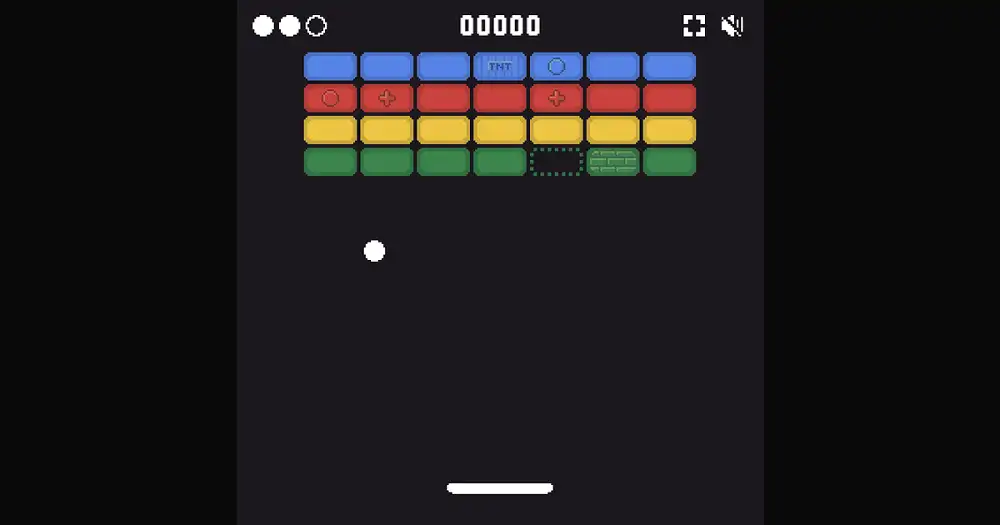
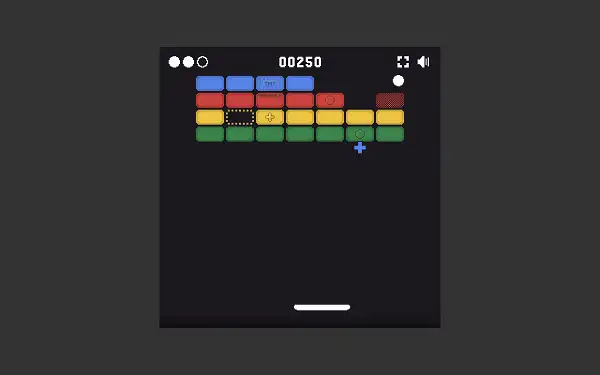
Google Block Breaker is a free, browser-based brick-breaker game where you slide a paddle along the bottom of the screen to bounce a ball up into a wall of colored blocks. Clear every block and a fresh, faster wall drops in. Let the ball fall past your paddle too many times, and it’s game over. It’s a direct descendant of Atari’s Breakout, originally released in 1976, and specifically of Google’s famous 2013 tribute to that game – a hidden Easter egg where searching “Atari Breakout” in Google Images briefly turned your search results into playable bricks.
The modern Block Breaker you’re playing now is a considerably deeper, standalone evolution of that original tribute – built with a full power-up system, several types of hazard blocks that actively fight back, and a genuinely endless difficulty ramp that keeps the game challenging no matter how good you get.
The Real History Behind Breakout
Breakout’s origin story is one of the more famous tales in video game history, and it directly involves two names everyone recognizes for a completely different reason. In 1976, Atari co-founder Nolan Bushnell and colleague Steve Bristow came up with the concept – essentially Pong rotated 90 degrees, with the second paddle replaced by a wall of bricks. Atari handed the actual hardware design to a young engineer named Steve Jobs, who in turn brought in his friend Steve Wozniak – the future co-founder of Apple – to help build it.
The two worked for days straight, and Wozniak’s famously efficient chip design used far fewer components than Atari expected, earning a bonus on top of their base pay. Here’s the part most retellings skip: Jobs told Wozniak they’d earned $700 total to split evenly, but Atari had actually paid a $5,000 bonus for finishing early and using so few chips – Jobs kept the difference for himself, and Wozniak reportedly didn’t learn the full truth for years. Breakout itself went on to become a genuine commercial hit, shipping roughly 11,000 arcade cabinets and earning around $11 million in 1976 – equivalent to somewhere in the ballpark of $62 million today.
The hardware lessons from building Breakout fed directly into Wozniak’s design work on the Apple II – he’s spoken directly about how the paddle controllers, color graphics circuitry, and sound design he built for Breakout shaped decisions he made on Apple’s first mass-market computer. He even wrote a software clone of it called “Brick Out” in Integer BASIC specifically to demo the Apple II’s capabilities at the Homebrew Computer Club.
From Google Easter Egg to Standalone Game
Google’s tribute to Breakout launched in May 2013, timed specifically to the 37th anniversary of the original 1976 release. Searching “Atari Breakout” in Google Images triggered the hidden game, using your search results as the bricks – one of the most widely shared Google Easter eggs of its era, alongside things like the hidden Pac-Man and Snake games. Google eventually removed the original Image Search trigger around 2020, but the underlying game concept lived on. Archived “elgooG” mirror sites preserve the original experience, and standalone browser builds like this one carry the concept forward as a permanently accessible game rather than a hidden trick you need to remember specific search terms for.
How to Play Google Block Breaker
- Move your paddle to track the ball. Slide left and right along the bottom of the screen to stay under the ball.
- Launch the ball to begin. A short press gets the ball moving into the wall of blocks above.
- Control your bounce angle. Where the ball contacts your paddle changes its rebound direction – hit it dead center for a fairly straight bounce, or catch it near the paddle’s edge to send it off at a sharp angle. This is the single biggest skill in the game, letting you steer the ball into specific clusters and awkward corners on purpose.
- Catch falling power-ups. Certain blocks drop useful pickups when destroyed – move your paddle underneath them to activate the effect.
- Watch for falling hazards too. Not everything that drops is good for you – some blocks release acid or spores that debuff you if they land on your paddle.
- Clear the whole board to advance. A new, faster wall of blocks appears once you’ve cleared the last one.
- Don’t let the ball fall past your paddle. You start with 3 lives – lose all of them, and the run ends.
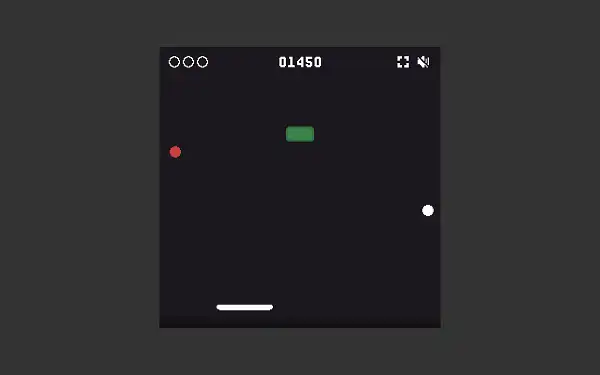
Controls
| Action | Desktop | Mobile |
|---|---|---|
| Move Paddle Left | A or Left Arrow | Drag finger left |
| Move Paddle Right | D or Right Arrow | Drag finger right |
| Launch Ball / Fire | Spacebar, W, or Up Arrow | Tap the screen |
Mouse users can also move the paddle by moving the pointer and click to launch or fire, which some players find gives finer control than the keyboard. The “fire” input doubles up with launching the ball – once you’ve got a laser paddle or fireball power-up active, the same key or tap triggers your active weapon.
Block Types
- Colored Blocks – The standard bricks, in blue, green, red, and yellow. One hit destroys them.
- Brick Blocks (2-Hit) – Tougher blocks that take two hits to clear – the first hit cracks them, the second finishes the job. These are the blocks that genuinely gate your progress on denser boards.
- Mirror Blocks – Visual variants of the standard colored blocks with their own distinct hit sounds and behavior.
- Colored Power-Up Blocks – Special versions of the standard colors that drop a power-up for your paddle to catch when destroyed.
- Multiball Blocks – Split your ball into several at once when destroyed, dramatically increasing how fast you can clear a board – at the cost of a lot more to track at once.
- Heart Blocks – Drop a heart pickup that restores or adds an extra life if caught.
Hazard Blocks
- TNT Blocks – Highly unstable. One hit arms them, and they explode shortly after, destroying every adjacent block around them. Excellent for chain-clearing dense clusters, but the blast doesn’t discriminate between blocks you wanted gone and ones you were saving for a combo.
- Acid Blocks – Release falling acid when hit. If it lands on your paddle, you take a negative debuff effect.
- Mushroom Blocks – Release a drifting spore when broken, which applies a debuff if it lands on your paddle – similar risk to acid, but with a slower, more unpredictable drift pattern.
- Rubble – Dropped by hard blocks when destroyed. Landing on your paddle temporarily shrinks it, making it harder to track the ball – the direct opposite of the paddle-expanding power-up.
This is what separates the modern Block Breaker from the original 1976 arcade version – the board isn’t just a passive wall waiting to be demolished, it’s actively fighting back with falling hazards you need to dodge or block.
Power-Ups
| Power-Up | Effect |
|---|---|
| Expand Paddle | Widens your paddle, making the ball significantly easier to catch and control. |
| Shield / Barrier | Raises a protective barrier along the bottom of the screen, bouncing a dropped ball back into play instead of losing it. Also grants immunity to hazard debuffs while active. |
| Fireball | Supercharges the ball to smash through multiple blocks in a single pass instead of bouncing off. Short duration – use it immediately. |
| Laser Paddle | Equips your paddle to fire lasers upward on command, destroying blocks on contact – ideal for precisely clearing stubborn or awkwardly placed blocks. Runs on a timer. |
| Targeting / Lock-On | A homing assist that locks the ball onto the nearest block, guiding it toward a near-guaranteed hit. |
| Multi-Ball | Splits your ball into several at once for maximum, chaotic block destruction. |
| Extra Life / Heart | Adds a life to your current run. |
Power-ups drop from specific blocks and float downward – catch them with your paddle to activate, or let them fall past and lose the chance entirely. They don’t have to be triggered the instant you see them drop; a caught power-up can be held and used at a moment that suits your current situation better.
Scoring and Lives
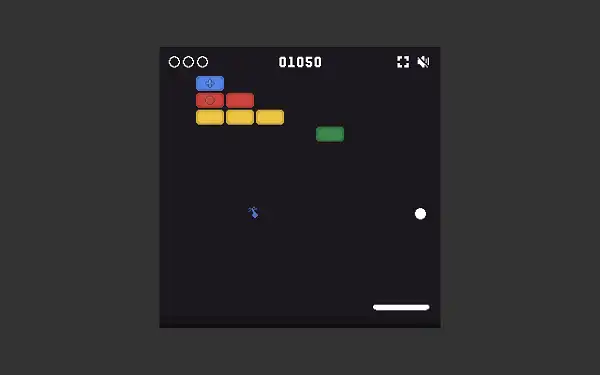
You start each run with 3 lives. Breaking a standard block banks a base of 50 points, with bigger bonuses tied to power-up events and combos. There’s no fixed finish line – Block Breaker is a pure endless score chase, which is why dedicated players talk about “world record” runs reaching into the millions of points. Your personal high score is saved locally in your browser and displayed as your target to beat every time you play.
Difficulty Curve
The game’s difficulty ramps in a genuinely precise, escalating way rather than just getting randomly harder. Each time you clear a full board, your level count increases and a new wall drops in, along with a rising speed and intensity multiplier that affects both ball speed and how fast hazards fall. Early levels are seeded generously with power-up blocks to ease you in and gentler in their block mix, while later levels weight in a steadily higher proportion of hard and hazard blocks, up to a capped maximum. The game also deliberately throttles how many extra-hard blocks appear while you’re down to your last life or two, avoiding unfair difficulty spikes right when you’re most vulnerable.
The net effect: your first few boards feel breezy and forgiving, and then the pace and hazard density climb steadily until simply surviving – not just clearing blocks – becomes the real test.
Tips and Tricks
- Master paddle-edge bouncing early. Since your bounce angle depends on exactly where the ball contacts your paddle, deliberately catching it off-center to steer toward specific clusters is a far more powerful tool than just tracking the ball reactively.
- Grab Fireball power-ups the instant you see them. Its duration is short and its clearing potential is huge – there’s rarely a reason to hesitate on this one.
- Save Laser Paddle for moments you can spare attention. Since it requires an active fire input, grabbing it while you’re mid-panic tracking a fast ball can actually work against you – it’s most valuable when the board has slowed down enough to aim deliberately.
- Combine Multi-Ball with Expand Paddle when you can. A wider paddle covers the much larger area that several simultaneous balls demand, making this pairing one of the strongest combinations in the game.
- Treat Shield as your panic button. Beyond just saving a dropped ball, it also blocks acid, spore, and rubble debuffs entirely – holding onto one for a particularly hazard-dense board is often smarter than triggering it immediately.
- Respect TNT blocks’ blast radius. They’re fantastic for clearing dense clusters in one go, but think about what’s adjacent before you trigger one if you were specifically saving nearby blocks for a combo.
- Prioritize hard (2-hit) blocks when they’re gating your path. Since these often block access to blocks behind them, clearing them early in a board opens up more of your options for later hits.
Other Doodle Games
- Google Pac-Man Doodle
- Google Snake Doodle
- Doodle Cricket
- Doodle Baseball
- Google Solitaire
- Google Minesweeper
Frequently Asked Questions
What is Google Block Breaker?
Google Block Breaker is a free, browser-based brick-breaker game where you bounce a ball with a paddle to clear walls of blocks, featuring power-ups, hazard blocks, and an endless, escalating difficulty curve.
Is this the original Google Easter egg?
This is a standalone browser game built on the same core mechanics as Google’s original 2013 “Atari Breakout” Easter egg, which was removed from Google Image Search around 2020. This version lets you play the concept permanently rather than needing to trigger a hidden search feature.
Who created the original Breakout game?
Breakout was conceived at Atari by Nolan Bushnell and Steve Bristow in 1976, with the actual hardware built by Steve Jobs and Steve Wozniak – both later co-founders of Apple. Wozniak’s efficient chip design for the project directly influenced his later work on the Apple II.
What are the controls?
A or the Left Arrow moves the paddle left, D or the Right Arrow moves it right, and Spacebar, W, or the Up Arrow launches the ball and fires active power-ups like the laser. Mouse and touch controls are also supported.
How does the ball’s bounce angle work?
Where the ball contacts your paddle determines its rebound direction – hitting it near the center sends it fairly straight up, while catching it toward either edge sends it off at a sharper angle, letting skilled players steer shots deliberately.
What happens if I lose all my lives?
The game ends and your final score is shown alongside your saved high score. You start each run with 3 lives, though Heart pickups can add more during play.
What are the hazard blocks?
TNT blocks explode and destroy adjacent blocks, acid blocks drip a debuff-causing hazard toward your paddle, mushroom blocks release a similar debuff spore, and hard blocks can drop rubble that temporarily shrinks your paddle if it lands on you.
Is there an ending to the game?
No. Block Breaker is an endless score chase with no fixed finish line – you keep clearing progressively faster and harder boards until you run out of lives.
Which browser works best for Google Block Breaker?
The game runs well on Chrome, Firefox, and Edge.
Can I play Google Block Breaker on a phone or Chromebook?
Yes. It works in any modern browser, including on Chromebooks, and supports touch controls for moving the paddle and launching the ball on mobile devices.
Why isn’t Google Block Breaker loading?
Check your internet connection, make sure this site isn’t blocked on your network, and try disabling any ad blockers – these are the most common causes of loading issues.
Doodle Games