Google Solitaire Rules: Everything You Need to Know
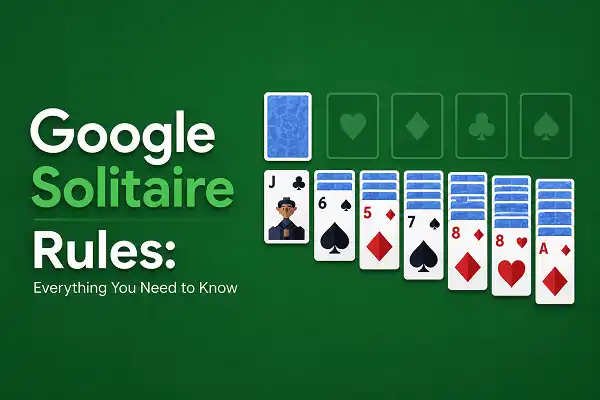
Google Solitaire runs on a fixed set of rules and once you know all of them, the game becomes a lot less mysterious. No random exceptions, no hidden gotchas. Just a clean rulebook that covers every situation you’ll encounter at the table.
This post is the complete rules reference for Google Solitaire. If you’re just starting out and want a step-by-step walkthrough of your first game, our Complete Beginner’s Guide is the better place to start. If you want to know the full ruleset — including the edge cases and situations that come up mid-game and leave you wondering what’s actually allowed that stay with me and read this article.
The Goal
One sentence: move all 52 cards into the four foundation piles, sorted by suit, in order from Ace up to King.
Each foundation pile belongs to one suit — Spades, Hearts, Clubs, Diamonds. Build each one starting with the Ace of that suit, then 2, 3, 4, all the way up to King. When all four foundations are complete, the game is won. Everything else in the rulebook is about how you legally get the cards there.
The Deal — How the Board Is Set Up
Google Solitaire uses a standard 52-card deck, dealt at the start of every new game. The board is divided into four areas:
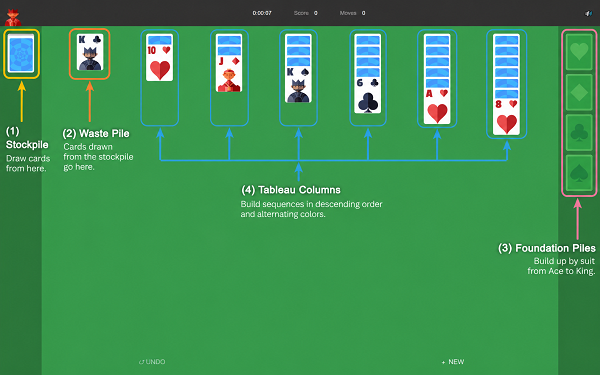
| Area | Cards | Purpose |
|---|---|---|
| Tableau | 28 cards across 7 columns | Main playing area — where cards are sorted and sequenced |
| Foundation | Starts empty (4 piles) | Where you build Ace-to-King by suit to win |
| Stock | 24 cards, face-down | Reserve pile — click to flip new cards into play |
| Waste | Starts empty | Where flipped stock cards land — top card always available |
The tableau starts with 28 cards across seven columns: column one has one card, column two has two, column three has three — all the way to column seven, which has seven. Only the top card of each column is dealt face up. Every card underneath starts hidden.
The remaining 24 cards form the stock pile, sitting face-down in the top-left corner. No cards are dealt to the foundations at the start — those four slots begin completely empty.
Tableau Rules
The tableau is where most of the game is played and where most of the rules apply. Get these right and the rest falls into place.
Only Face-Up Cards Can Move
Face-down cards are locked in place. You cannot move, select, or interact with them. When you move the face-up card covering a face-down card, the face-down card automatically flips over and becomes available. Uncovering hidden cards is one of the most important things you can do in Google Solitaire.
Tableau Stacking: Descending Order, Alternating Colors
In the tableau, cards stack in descending numerical order with alternating red and black colors. A card can only be placed on another card if it is exactly one rank lower and a different color family.
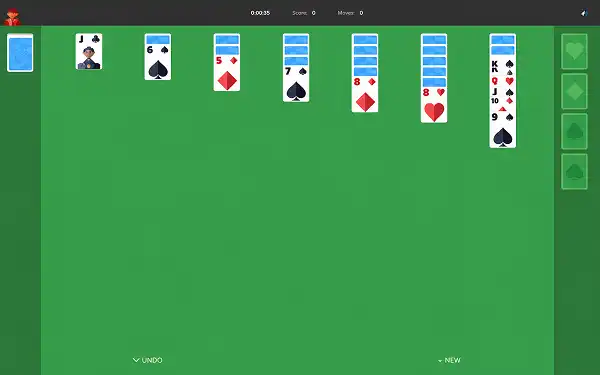
Examples of valid tableau moves:
- Red 9 onto black 10 ✓
- Black Queen onto red King ✓
- Red 4 onto black 5 ✓
Examples of invalid tableau moves:
- Red 9 onto red 10 ✗ (same color)
- Black 9 onto black 10 ✗ (same color)
- Red 8 onto black 10 ✗ (not consecutive — skips a rank)
- Red 10 onto black 9 ✗ (wrong direction — would be ascending)
Moving Groups of Cards
You are not limited to moving one card at a time. If a sequence of face-up cards in a tableau column is already in correct alternating descending order, you can pick up the entire group and move it as a unit — as long as the bottom card of the group lands on a card one rank higher in the opposite color.
For example: a stack of red 9, black 8, red 7 sitting in one column can be moved as a complete group onto a black 10 in another column. You do not need to move them one at a time.
Empty Columns: Kings Only
When all cards are cleared from a tableau column, that empty space can only be filled by a King — or by a sequence beginning with a King. No other card can start a new empty column.
This makes empty columns extremely valuable. Think carefully before filling one. The best use of an empty column is a King with a long sequence that lets you uncover multiple face-down cards beneath it.
Foundation Rules
Building Ace to King, Same Suit
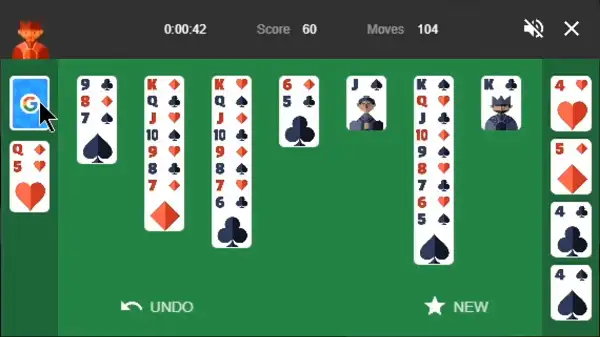
Each foundation pile accepts cards of one suit only, built in ascending order starting from the Ace. The moment an Ace becomes available — in the tableau, waste pile, or newly flipped from stock — you can (and usually should) send it to the foundation.
After the Ace, each foundation only accepts the next card in sequence for that suit:
Ace → 2 → 3 → 4 → 5 → 6 → 7 → 8 → 9 → 10 → Jack → Queen → King.
You cannot place an 8 of Hearts on a foundation pile that’s currently at 6 of Hearts — the 7 must go first.
Cards Can Come from Anywhere
Foundation cards can come from three places: the tableau (any face-up card on top of a column), the waste pile (the top card), or directly from the stock if you’re playing Easy Mode and the flipped card is the right one.
Can You Move Cards Back from the Foundation?
Yes — in Google Solitaire, a card can be moved back from the foundation to the tableau if it creates a useful move. The top card of any foundation pile is available to play back into the tableau if it fits the alternating-color descending rule.
This is worth knowing because it occasionally unlocks a move you’d otherwise be stuck on. That said, moving cards backward from the foundation is a last resort, not a routine move — every card back in the tableau is a card that needs to travel up to the foundation again.
Stock and Waste Pile Rules
Drawing from the Stock
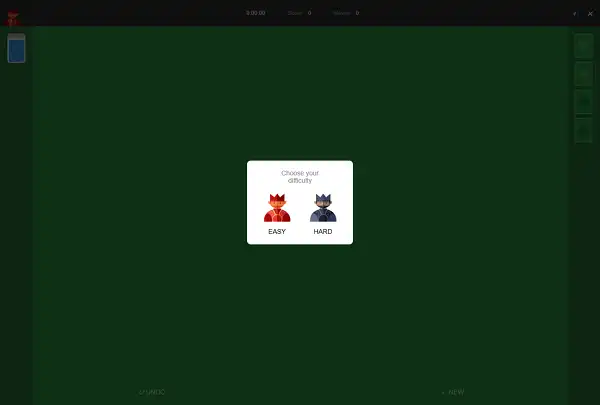
Click the stock pile to flip cards into the waste pile. How many cards flip at once depends on which mode you’re playing:
| Mode | Cards Flipped Per Click | Redeals |
|---|---|---|
| Easy Mode (Draw 1) | 1 card at a time | Unlimited — cycle the deck as many times as needed |
| Hard Mode (Draw 3) | 3 cards at a time, only top card playable | Limited passes through the deck |
Playing from the Waste Pile
The top card of the waste pile is always available to play — either to the tableau (if it fits the alternating-color descending rule on a face-up card) or directly to the foundation (if it’s the next card that pile needs).
The cards underneath it in the waste pile are not playable until the top card is moved. In Hard Mode, this is where the game gets significantly harder — two of the three flipped cards are immediately buried, accessible only when the deck cycles back around.
Cycling the Stock
Once all the cards in the stock have been flipped through, you can click the empty stock area to recycle the waste pile and start drawing again. In Easy Mode, you can do this an unlimited number of times. In Hard Mode, there is a limit on how many times you can pass through the deck — which means some cards may never become available if you can’t play them on earlier cycles.
For a full comparison of how the two modes affect strategy and win rate, see our post on Google Solitaire Easy Mode vs Hard Mode.
What You Cannot Do
There are no complicated exceptions, but these are the moves players most commonly try to make that simply aren’t allowed:
- You cannot move a face-down card. It must be flipped first by removing the card covering it.
- You cannot stack same-color cards in the tableau. Red on red, black on black — both are illegal regardless of rank.
- You cannot skip ranks in the tableau. A 7 cannot go on a 9 even if the colors alternate. It must go directly on an 8.
- You cannot place a non-King into an empty tableau column. Only a King, or a sequence starting with a King, can fill an empty slot.
- You cannot place a card on a foundation out of sequence. If the Hearts foundation is at 5, the 7 of Hearts cannot go there. The 6 must go first.
- You cannot play buried waste pile cards in Hard Mode. Only the top card of the waste pile is available. The cards underneath must wait until the stock cycles back.
- You cannot move a partial sequence from the middle of a column. If five cards are face-up in a column but only the bottom three are in correct alternating order, you cannot pick up just those three from underneath the others. You can only move sequences from the top of a column downward.
Easy Mode vs Hard Mode — The Rules Difference
The core rules of Google Solitaire are identical in both modes. The only thing that changes is the stock behavior.
Easy Mode gives you maximum access to the deck. One card flipped per click, unlimited redeals, no penalty for cycling through the stock. Every card will eventually surface if you keep drawing. This makes Easy Mode significantly more winnable — most deals can be solved with patient, deliberate play.
Hard Mode restricts access. Three cards flip at once, two stay buried, and the number of passes through the deck is limited. Cards can get permanently locked below others if the cycle runs out. Some Hard Mode deals are unwinnable regardless of skill — not because of a flaw in the game but because of how the rules interact with a three-at-a-time draw limit. This is documented behavior of draw-three Klondike in general. We cover it in detail in our post on whether Google Solitaire is always winnable.
The Complete Rules at a Glance
| Rule | Details |
|---|---|
| Deck | Standard 52 cards, no jokers |
| Tableau columns | 7 columns, 28 cards total — column 1 has 1, column 7 has 7 |
| Face-up at start | Top card of each tableau column only |
| Tableau stacking | Descending order, alternating red/black colors |
| Group moves | Allowed — move any correctly ordered sequence as a unit |
| Empty columns | Kings only (or sequences starting with a King) |
| Foundation building | Ace to King, same suit, one card at a time |
| Foundation source | Top of any tableau column or top of waste pile |
| Foundation back-moves | Allowed — top foundation card can return to tableau |
| Stock draw (Easy) | 1 card per click, unlimited redeals |
| Stock draw (Hard) | 3 cards per click, limited redeals |
| Waste pile | Top card always playable — cards underneath are not |
| Win condition | All 52 cards in four foundations, Ace to King by suit |
Frequently Asked Questions
Can you put any card in an empty column?
No. Only a King — or a sequence starting with a King — can go into an empty tableau column. This is one of the most important rules in the game and one of the most commonly tested.
Can you move multiple cards at once?
Yes, provided they’re already in correct alternating-color descending order. Pick up the group from the top of a column and place the whole thing on a card one rank higher in the opposite color.
Can you move a card back from the foundation?
Yes. The top card of any foundation pile can be moved back to the tableau if it fits the alternating-color descending rule. This is rarely necessary but occasionally unlocks a move you’d be stuck without.
What happens when the stock runs out?
Click the empty stock area to flip the waste pile back over and start drawing again. In Easy Mode you can do this unlimited times. In Hard Mode there is a limited number of passes, after which the stock is gone.
Can you play a card from the waste pile directly to the foundation?
Yes. If the top card of the waste pile is the next card a foundation pile needs, you can send it straight there without going through the tableau first.
Do you have to move a card to the foundation when you can?
No. Moving a card to the foundation is always optional. Experienced players often delay foundation moves deliberately to keep useful cards accessible in the tableau. The only exception is when the game auto-completes near the end — at that point all remaining moves are forced.
Is Google Solitaire always winnable?
No. In Easy Mode, the large majority of deals can be won with careful play — but not all of them. In Hard Mode, a significant portion of deals are mathematically unwinnable regardless of how well you play. See our full post on Google Solitaire win rates for the numbers behind this.
What’s the difference between Google Solitaire and regular Klondike?
Nothing — in terms of rules. Google Solitaire is Klondike Solitaire. The tableau setup, the foundation rules, the alternating stacking rule — all standard Klondike. The Easy/Hard mode toggle is the only addition.
Can you undo a move?
Yes. The undo button is available with no penalty in Google Solitaire. Use it freely — especially when learning the game. Taking back a move to try a different approach is part of developing good strategic instincts.
What’s Next
Now that the full rulebook is clear, the interesting questions are about strategy — not what’s allowed, but what’s smart. When should you move to the foundation? When should you hold back? How do you plan three or four moves ahead? Our post on 10 Tips to Win Google Solitaire Every Time covers the strategic layer built on top of these rules.
And if you want to put the rules into practice right now, play Google Solitaire here — free in your browser, no download needed.
If Klondike ever starts feeling too familiar, the rules change just enough in Spider Solitaire (build same-suit sequences across two decks) and FreeCell (all cards visible from the start, four open holding cells) to feel like entirely different games — even though the core card logic is familiar.
Blog
Muzamil Aslam
Muzamil Aslam is the founder and author behind GoogleSolitaire.me. He enjoys writing about solitaire, browser-based games, and gaming strategies, helping players improve their skills while enjoying classic card games online.