Solitaire for Beginners: How to Play Your First Game
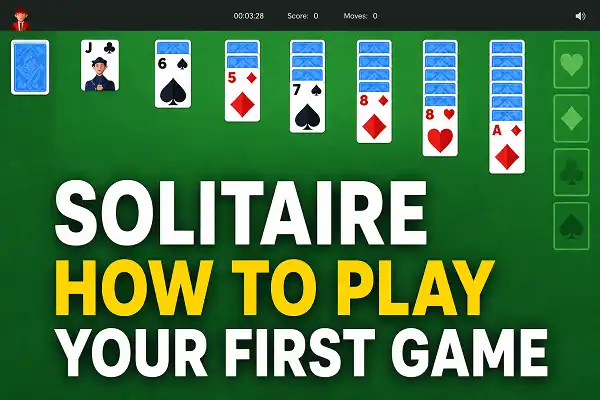
Solitaire is a solo card game where you sort a shuffled deck into four organized piles. It takes about two minutes to learn the basics and a few games to start feeling comfortable. This guide covers everything you need to play your first game — nothing assumed, nothing skipped.
➜ Open Google Solitaire here and follow along as you read.
What You’re Looking At
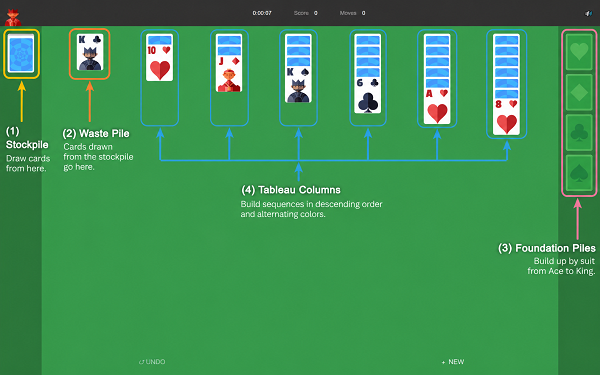
When you open the game, you’ll see three areas:
- Tableau — the seven columns of cards in the middle. This is where most of the action happens. Only the top card of each column is face-up at the start.
- Foundation piles — four empty slots in the top-right corner, one for each suit. Your goal is to fill these.
- Stock pile — a face-down pile in the top-left corner. Click it when you run out of moves to flip new cards.
The Goal
Move all 52 cards into the four foundation piles — one pile per suit (Spades, Hearts, Clubs, Diamonds) — in order from Ace up to King. When all four foundations are full, you’ve won.
The Two Rules That Govern Everything
Almost every move in Solitaire follows one of two rules:
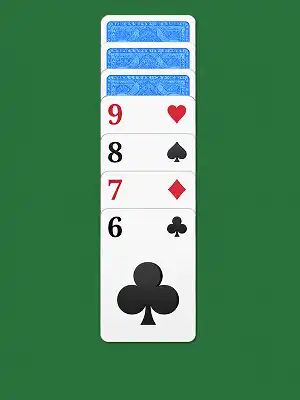
In the tableau: cards stack in descending order with alternating colors. A red card goes on a black card one rank higher. Black 8 on red 9. Red Queen on black King. That’s it.
In the foundations: cards build up by suit from Ace to King. Once you play an Ace of Hearts to a foundation, the 2 of Hearts goes next, then the 3, and so on.
Your First Game — What to Actually Do
Open a new game on Easy Mode. Here’s how to approach it:
Step 1 — Look for Aces first. Scan the seven face-up cards across the tableau. If any of them is an Ace, move it to the foundation immediately. Aces start each foundation pile and are always the right first move.
Step 2 — Make tableau moves. Look for face-up cards that can stack on each other. Can any card go on top of another? Move it — especially if it reveals the face-down card underneath. Revealing hidden cards is one of the most valuable things you can do.
Step 3 — Click the stock when stuck. When no tableau moves are available, click the stock pile in the corner to flip a new card. If it’s playable — either to the tableau or the foundation — use it. If not, flip another.
Step 4 — Repeat. Keep revealing cards, stacking in the tableau, and sending Aces and their sequences to the foundations. The game ends when all 52 cards are on the foundations — or when you’ve exhausted every move.
A Few Things to Know Before You Start
Empty columns only accept Kings
When you clear out an entire tableau column, only a King can go there. Nothing else. Don’t leave a column empty unless you have a King ready — or unless you need the space to maneuver.
Easy Mode vs Hard Mode
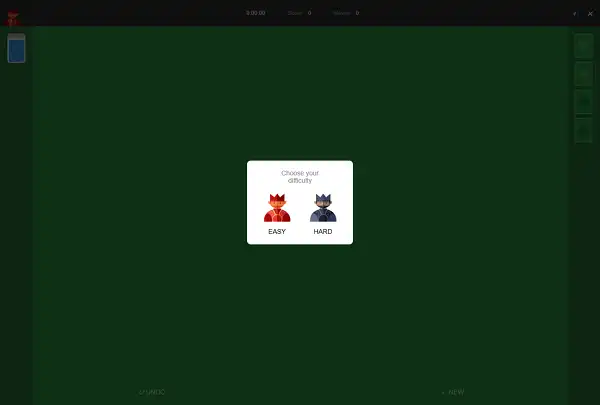
Easy Mode flips one card from the stock at a time with unlimited passes through the deck. Hard Mode flips three cards at once with limited passes. Start on Easy Mode — it lets you see every card eventually and makes the game much more winnable while you’re learning. Full comparison in our Easy vs Hard Mode guide.
Not every game is winnable
About 18% of Solitaire deals are mathematically unwinnable regardless of how well you play. If you’ve cycled through the stock, made every possible move, and still can’t progress — the game may just be one of those deals. Start a new one. It’s not a mistake, it’s the odds.
Use undo freely
There’s no penalty for undoing a move. New players often realize three moves later that a decision was wrong. Undo and try something different — that’s how you develop a feel for the game.
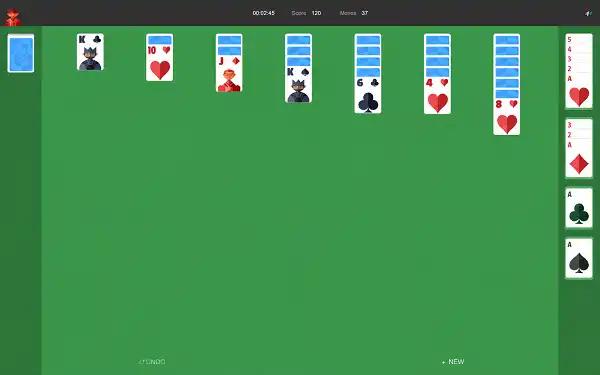
Your First Game — What to Actually Do
Open a new game on Easy Mode. Here’s how to approach it:
Step 1 — Look for Aces first. Scan the seven face-up cards across the tableau. If any of them is an Ace, move it to the foundation immediately. Aces start each foundation pile and are always the right first move.
Step 2 — Make tableau moves. Look for face-up cards that can stack on each other. Can any card go on top of another? Move it — especially if it reveals the face-down card underneath. Revealing hidden cards is one of the most valuable things you can do.
Step 3 — Click the stock when stuck. When no tableau moves are available, click the stock pile in the corner to flip a new card. If it’s playable — either to the tableau or the foundation — use it. If not, flip another.
Step 4 — Repeat. Keep revealing cards, stacking in the tableau, and sending Aces and their sequences to the foundations. The game ends when all 52 cards are on the foundations — or when you’ve exhausted every move.
A Few Things to Know Before You Start
Empty columns only accept Kings
When you clear out an entire tableau column, only a King can go there. Nothing else. Don’t leave a column empty unless you have a King ready — or unless you need the space to maneuver.
Easy Mode vs Hard Mode
Easy Mode flips one card from the stock at a time with unlimited passes through the deck. Hard Mode flips three cards at once with limited passes. Start on Easy Mode — it lets you see every card eventually and makes the game much more winnable while you’re learning. Full comparison in our Easy vs Hard Mode guide.
Not every game is winnable
About 18% of Solitaire deals are mathematically unwinnable regardless of how well you play. If you’ve cycled through the stock, made every possible move, and still can’t progress — the game may just be one of those deals. Start a new one. It’s not a mistake, it’s the odds.
Use undo freely
There’s no penalty for undoing a move. New players often realize three moves later that a decision was wrong. Undo and try something different — that’s how you develop a feel for the game.
Frequently Asked Questions
What is the easiest version of Solitaire for beginners?
Klondike on Easy Mode (draw one card at a time) — which is what Google Solitaire uses. Every card will eventually surface since you can cycle through the stock unlimited times, which makes it far more forgiving while you’re learning.
How long does a game of Solitaire take?
Usually 5–15 minutes on Easy Mode. Games that end early (either won quickly or stuck with no moves) can finish in under three minutes. There’s no timer — you play at your own pace.
What does it mean when there are no more moves?
Check the stock pile first — if it has cards left, flip them. If the stock is empty too and no card can go anywhere in the tableau or foundations, the game is over. Start a new one.
Can you always win Solitaire?
No — about 18% of deals are unwinnable regardless of how well you play. In Easy Mode, most games are winnable with patient play. If you’re stuck after cycling through the full deck with no moves left, it’s likely one of the unwinnable deals.
Do I need to sign up or download anything?
No. Google Solitaire loads instantly in any browser — desktop or mobile — with no account, no app, and no download needed.
Blog
Muzamil Aslam
Muzamil Aslam is the founder and author behind GoogleSolitaire.me. He enjoys writing about solitaire, browser-based games, and gaming strategies, helping players improve their skills while enjoying classic card games online.